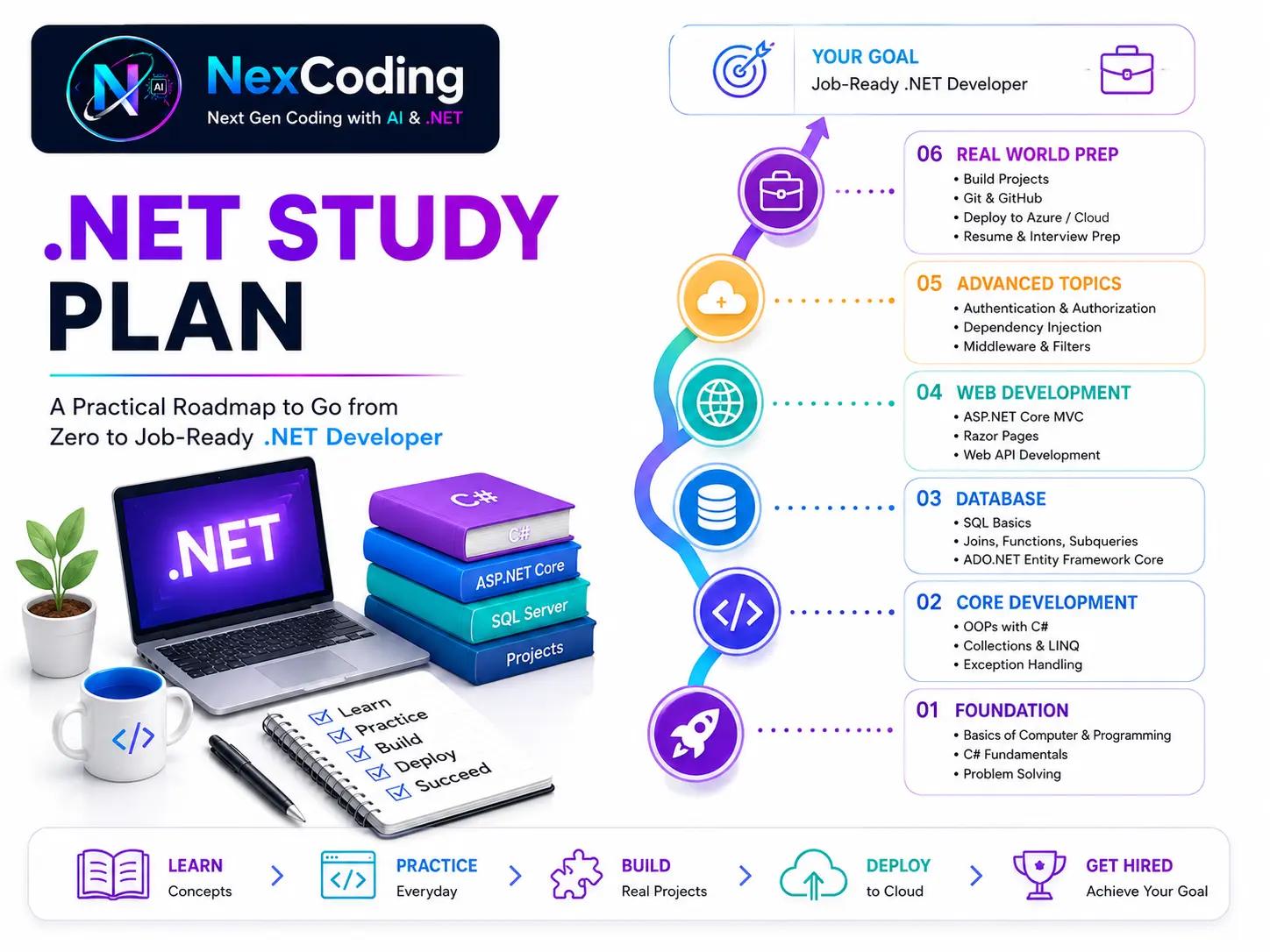
Study Plan — .NET Developer in 6 Months
Level: Beginner to Job Preparation
- What to study first, second, and third
- How much time each major topic may take
- Which path to follow for backend, full-stack, or complete .NET learning
- How daily study can connect to one real project
- What tools to install before coding
- How the School Management System grows stage by stage
Follow the 12-stage roadmap. Every stage builds on the previous. Same project — School Management System — grows with you from console app to Azure deployment.
On this page: Goal | Technologies | Learning Paths | Week-by-Week | Daily Schedule | Checklist
Before You Begin
Read these two articles first:
-
How Web Applications Work — Understand what you are building. What is a server? What is a database? How does Zomato work behind the scenes? (15 min)
-
What is .NET and why learn it — What jobs it gets you, what companies use it, how it compares to Python/Java. (20 min)
Confused about AI vs backend? Read AI vs .NET/Java Jobs.
Not sure which path fits you? Read Choose Your Journey.
Install These (1 hour total)
| Tool | Link | Size | Notes |
|---|---|---|---|
| Visual Studio Community 2022 | visualstudio.microsoft.com/vs/community | ~2GB | Select: ASP.NET + .NET desktop development |
| SQL Server Express 2022 | microsoft.com/sql-server/sql-server-downloads | ~1GB | Free, local development |
| SSMS | aka.ms/ssmsfullsetup | ~500MB | Query SQL Server visually |
| Git | git-scm.com/downloads | ~50MB | Version control |
| GitHub | github.com | — | Free account (10 min signup) |
Done installing? Pick your goal below.
Pick Your Goal
| Goal | Stages to Complete | Time |
|---|---|---|
| Junior .NET Backend Developer | Stage 01 – 06 | 4–5 months |
| Full-Stack .NET Developer | Stage 01 – 08 | 6–7 months |
| Complete .NET Developer | All 12 stages | 8–10 months |
| Upgrade from .NET Framework | Stage 01, 04, 05, 06 | 2–3 months |
View 1 — Time Per Technology
How long each technology takes to learn well enough for a job:
| Technology | Stage | Time to Learn | What You Can Do After |
|---|---|---|---|
| .NET Platform & Tools | Stage 01 | 1 week | Set up environment, use CLI, push code to GitHub |
| C# Fundamentals | Stage 02 | 4 weeks | Write OOP code, LINQ, async, design patterns |
| SQL Server | Stage 03 | 2 weeks | Design DB, write queries, stored procedures |
| EF Core | Stage 04 | 2 weeks | Connect C# to DB, all relationships, migrations |
| ASP.NET Core MVC | Stage 05 | 2 weeks | Build web UI with Razor, forms, authentication |
| Web API + JWT | Stage 06 | 2 weeks | Build REST API with security, Swagger, roles |
| Dapper | Stage 07 | 1 week | Write complex report queries |
| React | Stage 08 | 3 weeks | Build frontend that calls your API |
| Angular | Stage 09 | 3 weeks | Same frontend in Angular |
| Blazor | Stage 10 | 2 weeks | C# frontend — no JavaScript |
| Razor Pages | Stage 11 | 1 week | Simplified MVC for page-focused apps |
| Azure Deploy | Stage 12 | 1 week | Deploy full stack to production |
Total (all 12): ~24 weeks = 6 months
View 2 — Combined Learning Paths
🎯 Path A — Junior .NET Backend Developer (Most Hired)
| Stage | Technology | Time |
|---|---|---|
| 01 | .NET Platform & Tools | 1 week |
| 02 | C# Fundamentals | 4 weeks |
| 03 | SQL Server | 2 weeks |
| 04 | EF Core | 2 weeks |
| 05 | ASP.NET Core MVC | 2 weeks |
| 06 | Web API + JWT | 2 weeks |
| Total | 13 weeks | 3 months |
| + Practice | Real project | +1 month |
| Ready | First job | 4 months |
You build: Complete REST API with JWT auth, Swagger, EF Core, SQL Server. Deploy to Azure.
🚀 Path B — Full-Stack .NET Developer
| Stage | Technology | Time |
|---|---|---|
| 01–06 | All of Path A | 13 weeks |
| 07 | Dapper | 1 week |
| 08 | React Frontend | 3 weeks |
| Total | 17 weeks | 4.5 months |
| + Practice | Build & refine | +1.5 months |
| Ready | Full-stack job | 6 months |
You build: API + Admin Portal + React Student Dashboard. End-to-end on Azure.
💎 Path C — Complete .NET Developer (All Tech)
| Stage | Technology | Time |
|---|---|---|
| 01–08 | Path B (React) | 17 weeks |
| 09 | Angular | 3 weeks |
| 10 | Blazor | 2 weeks |
| 11 | Razor Pages | 1 week |
| 12 | Azure + CI/CD | 1 week |
| Total | 24 weeks | 6 months |
You build: Same system in React, Angular, AND Blazor. Senior interview differentiator.
🔄 Path D — Upgrade from .NET Framework
For developers who know C# but learning .NET Core:
| Stage | Technology | Time | Focus |
|---|---|---|---|
| 01 | .NET Platform | 1 week | SDK + tooling (skim) |
| 04 | EF Core | 2 weeks | Code First approach |
| 05 | ASP.NET Core MVC | 2 weeks | Middleware, DI, new patterns |
| 06 | Web API + JWT | 2 weeks | Modern REST + security |
| Total | 7 weeks | 2 months | Skip C# fundamentals |
6-Month Week-by-Week Plan
Month 1 — Foundation (Stage 01 + 02)
| Week | Stage | Topics | Build |
|---|---|---|---|
| Week 1 | Stage 01 | What is .NET, CLR, SDK, dotnet CLI | Install VS, create Console App |
| Week 1 | Stage 01 | Visual Studio, Git, GitHub setup | Push first project to GitHub |
| Week 2 | Stage 02 | C# Variables, Operators, Control Flow, Loops | Student marks calculator |
| Week 3 | Stage 02 | Methods, Classes, Inheritance, Interfaces | Student + Teacher classes |
| Week 4 | Stage 02 | Collections, LINQ, Exception Handling, Async | Student report card generator |
Month 2 — Database (Stage 03 + 04)
| Week | Stage | Topics | Build |
|---|---|---|---|
| Week 5 | Stage 03 | SQL Server — design 12-table schema | Create all tables in SSMS |
| Week 6 | Stage 03 | T-SQL — SELECT, JOIN, GROUP BY | Write 10 queries on SMS data |
| Week 7 | Stage 03 | Stored procedures, Views, Indexes | usp_GetStudentReport |
| Week 8 | Stage 04 | EF Core — DbContext, Code First, Migrations | Connect console app to DB |
Month 3 — Web Layer (Stage 04 + 05)
| Week | Stage | Topics | Build |
|---|---|---|---|
| Week 9 | Stage 04 | EF Core relationships, N+1, global filter | All 12 tables connected |
| Week 10 | Stage 04 | Soft delete, Audit log, Dapper reports | Fee report via Dapper |
| Week 11 | Stage 05 | ASP.NET Core — middleware, DI, config | School Admin Portal scaffold |
| Week 12 | Stage 05 | MVC — Controllers, Razor, model binding | Student CRUD in browser |
Month 4 — API + Security (Stage 06 + 07)
| Week | Stage | Topics | Build |
|---|---|---|---|
| Week 13 | Stage 06 | REST API, DTOs, Guid security | GET /api/students |
| Week 14 | Stage 06 | JWT Auth, Roles, Swagger | Login endpoint + token |
| Week 15 | Stage 06 | CORS, versioning, global error handling | Full API with all endpoints |
| Week 16 | Stage 07 | Dapper complex reports | Attendance + fee reports |
Month 5 — Frontend (Stage 08 + 09)
| Week | Stage | Topics | Build |
|---|---|---|---|
| Week 17 | Stage 08 | React — components, hooks, fetch | Student list from API |
| Week 18 | Stage 08 | JWT in React, protected routes, forms | Login + dashboard |
| Week 19 | Stage 09 | Angular — components, services, HttpClient | Same portal in Angular |
| Week 20 | Stage 09 | AuthGuard, reactive forms, observables | Angular login + CRUD |
Month 6 — Full Stack + Deploy (Stage 10–12)
| Week | Stage | Topics | Build |
|---|---|---|---|
| Week 21 | Stage 10 | Blazor — Razor components, @bind | Student portal in C# |
| Week 22 | Stage 11 | Razor Pages — PageModel, OnGet/OnPost | Self-service portal |
| Week 23 | Stage 12 | Azure App Service, Azure SQL | API live on Azure |
| Week 24 | Stage 12 | GitHub Actions CI/CD, production checklist | Full stack deployed |
Milestone Celebrations — Mark Your Progress
As you move through the weeks, celebrate these wins:
✅ Week 1: First project on GitHub (your code is saved!)
✅ Week 4: Console app finished (you built something!)
✅ Week 8: Connected C# to database (now you understand data!)
✅ Week 12: Admin portal works in browser (first real UI!)
✅ Week 16: Full API built + authenticated (this is what companies build!)
✅ Week 20: React app fetches from your API (full stack works!)
✅ Week 24: Deployed to Azure (your app is on the internet! 🎉)
These checkpoints are real. Each one proves you've learned something major.
Sample Daily Activities — Real Examples
Week 1 Example (Stage 01: Setup)
Monday:
- 8:00-8:30 AM: Read "What is .NET" → Understand platform concept
- 8:30-9:30 AM: Install Visual Studio Community → Get environment working
- 9:30-10:00 AM: Create first Console App → Run it, see output
Tuesday:
- 8:00-8:30 AM: Read ".NET CLI and dotnet commands" → Learn CLI tools
- 8:30-9:30 AM: Create project via
dotnet new console→ Learn command line - 9:30-10:00 AM: Debug — What happens if you type command wrong?
Wednesday:
- 8:00-8:30 AM: Read "Git & GitHub Basics" → Understand version control
- 8:30-9:30 AM:
git inityour project,git add,git commit→ Practice commands - 9:30-10:00 AM: Create GitHub account, push your code → See it live online
Weekend:
- Saturday: Review all 3 days + take AiTip quiz
- Sunday: Try creating Console App yourself from scratch (10x total time if needed)
Week 2 Example (Stage 02: C# Variables)
Monday:
- 8:00-8:30 AM: Read "Variables and Data Types" → Learn int, string, bool
- 8:30-9:30 AM: Write code — Create student profile (name, rollno, marks)
- 9:30-10:00 AM: Experiment — Change types, see what errors appear
Tuesday:
- 8:00-8:30 AM: Read "Operators and Math" → Learn +, -, *, /
- 8:30-9:30 AM: Write code — Student marks calculator (total, average, percentage)
- 9:30-10:00 AM: Test with real data (Ravi: 85, 92, 78)
Wednesday:
- 8:00-8:30 AM: Read "If-Else Statements" → Learn conditional logic
- 8:30-9:30 AM: Add grade assignment (if avg >= 90 → "A+", else "A", etc.)
- 9:30-10:00 AM: Break it intentionally — change conditions, see what breaks
Weekend:
- Build: Student report card app from scratch (takes 3-4 hours)
- Check: Can you build WITHOUT looking at examples?
Daily Study Schedule
Weekday (2 hours minimum)
| Time | Activity | Goal |
|---|---|---|
| 30 min | Read the article | Understand concepts |
| 60 min | Write code from scratch | Build muscle memory |
| 30 min | Break things + fix them | Learn what breaks & why |
Weekend (3-4 hours)
- Add one new feature to School Management System
- Review the week's concepts
- Do the AiTip interview Q&A at bottom of articles
Type every code example yourself. NO copy-paste.
Your hands need syntax as much as your brain. Students who type everything get hired. Copy-paste students get stuck in interviews.
Staying Consistent — Real Advice
Consistency wins. Always.
✅ 1 hour daily beats 8 hours once/week
✅ Same time daily builds habit (8:30 AM = code time)
✅ Celebrate small wins (finished Stage 1! 🎉)
✅ Join community (show your progress, get encouragement)
✅ If you miss 1 day: resume next day (don't give up)
12 weeks feels long. But you'll be shocked how fast it goes when you're consistent.
If you missed Week 2-3 and feel behind:
- Don't restart — continue from where you stopped
- Do 1 extra hour this week — small catch-up
- Skip optional exercises — only main content matters
- By next week — you'll be on track
Missing 1-2 weeks doesn't ruin anything. Giving up does.
Need visual walkthrough of study plan? Video coming soon. Subscribe to NexCoding YouTube for updates.
Document your journey (this is optional, but powerful):
- Twitter/LinkedIn: "Day 7 of learning .NET — built student marks calculator" (screenshots)
- GitHub: Push your work, write good READMEs
- Show your final: Deployed URL on your portfolio
- Help others: Answer questions, share what you learned
People who build in public:
✅ Get accountability (you'll finish)
✅ Get feedback (improve faster)
✅ Get noticed (companies see your work)
✅ Help others (pay it forward)
Not required. But if you do, you'll stand out.
Job Readiness Checklist
✅ Junior .NET Backend Developer
Before applying, you should know:
- C# OOP — classes, inheritance, interfaces, polymorphism
- Async/await — explain what happens to the thread
- LINQ — Where, Select, GroupBy, OrderBy
- Exception handling — throw vs throw ex
- ASP.NET Core — middleware pipeline, DI
- Web API — REST verbs, status codes, DTOs
- JWT authentication — explain the full flow
- EF Core — DbContext, migrations, relationships
- SQL Server — SELECT, JOIN, stored procedures
- Git — commit, branch, push, pull request
- Swagger — setup and test endpoints
- Can build and explain School Management API end-to-end
✅ Full-Stack .NET Developer (additional)
- React or Angular — hooks/services, HTTP calls, JWT
- Protected routes — role-based UI
- Azure deployment — App Service + Azure SQL
- GitHub Actions CI/CD
- Docker basics
Full Topic Checklist — Print & Tick Off
Stage 01 — .NET Platform & Tools
- What is .NET — CLR, SDK, Runtime
- CLR, CTS, CLS, IL, JIT
- dotnet CLI — new, run, build, publish
- Project types — Console, Web API, MVC, ClassLib
- NuGet — install, manage packages
- Assemblies and Namespaces
- .NET versions — LTS vs STS, which to use
- Visual Studio — setup, debugging, shortcuts
- VS Code — extensions, terminal
- Git — init, add, commit, branch, merge
- GitHub — push, pull request, Actions
Stage 02 — C# Fundamentals
Core:
- Variables, data types, type conversion
- Operators, if/else, switch
- for, while, foreach loops
- Methods — parameters, return, overloading
- Classes and objects — fields, properties, constructors
- Inheritance — virtual, override, sealed
- Interfaces and abstract classes
- Encapsulation — access modifiers, properties
- Collections — List, Dictionary, HashSet
- LINQ — Where, Select, GroupBy, OrderBy, Join
- Exception handling — try/catch/finally/throw
- Async / Await — Task, Task<T>, WhenAll
- String — methods, StringBuilder, interpolation
- File I/O — read, write, CSV
Advanced:
- Generics — List<T>, IRepository<T>
- Delegates, Func, Action, Events
- Design patterns — Singleton, Factory, Repository
- ref, out, in keywords
- static keyword — class, method, constructor
- Extension methods
- Nullable reference types (C# 8+)
- IDisposable and using statement
- Memory — Stack vs Heap, Boxing
- Modern C# — records, pattern matching, switch expression
Stage 03 — SQL Server
- Database design — tables, PK, FK, normalization
- CREATE TABLE, constraints, indexes
- SELECT, INSERT, UPDATE, DELETE
- WHERE, GROUP BY, HAVING, ORDER BY
- INNER JOIN, LEFT JOIN, RIGHT JOIN
- Subqueries and CTEs
- Stored procedures
- Views and Indexes
- RANK(), ROW_NUMBER()
- Transactions — BEGIN, COMMIT, ROLLBACK
- SSMS — connect, query, manage
Stage 04 — Entity Framework Core
- DbContext and DbSet
- Code First — define models
- Migrations — add, update, remove
- One-to-One relationship
- One-to-Many relationship
- Many-to-Many relationship
- Eager loading — Include, ThenInclude
- N+1 problem and fix
- Global query filter — multi-tenancy
- Soft delete
- Audit log via SaveChanges override
- Seeding data — HasData
- Dapper alongside EF Core
Stage 05 — ASP.NET Core MVC
- Middleware pipeline — request/response flow
- Dependency Injection — AddScoped, AddSingleton, AddTransient
- Configuration — appsettings.json, secrets
- Logging with ILogger
- Controllers and Actions
- Razor Views — .cshtml, Layout, _ViewStart
- Model binding and validation
- Data annotations — Required, StringLength, Range
- Tag Helpers
- Cookie authentication
- Role-based views
- Pagination and search
Stage 06 — Web API + JWT
- REST principles — stateless, uniform interface
- HTTP verbs — GET, POST, PUT, PATCH, DELETE
- Status codes — 200, 201, 204, 400, 401, 403, 404, 422, 500
- DTOs — never expose entity directly
- Guid for public IDs — never expose int
- JWT — header, payload, signature, flow
- Role-based authorization
- Swagger — setup, JWT header, try it out
- CORS — configure for frontend
- API versioning
- Global error handling — ProblemDetails
- Pagination and filtering
- Postman — test all endpoints
Stage 07 — Dapper
- Dapper vs EF Core — when to use which
- QueryAsync — SELECT
- ExecuteAsync — INSERT/UPDATE/DELETE
- Multi-mapping — JOIN results to objects
- Stored procedure via Dapper
- Dynamic parameters
- Bulk operations
Stage 08 — React
- Components and JSX
- Props and state
- useState and useEffect hooks
- Fetch API — GET, POST, PUT, DELETE
- JWT in localStorage
- Protected routes — redirect if no token
- Forms and validation
- Role-based rendering
Stage 09 — Angular (Bonus)
- Components, modules, decorators
- Services and Dependency Injection
- HttpClient — GET, POST, PUT, DELETE
- AuthGuard — protect routes
- Reactive Forms
- Observables and RxJS basics
Stage 10 — Blazor (Bonus)
- Blazor Server vs WebAssembly
- Razor components (.razor)
- Data binding — @bind
- Component parameters
- AuthenticationStateProvider
- HttpClient in WASM
Stage 11 — Razor Pages (Bonus)
- Razor Pages vs MVC — when to use
- PageModel — OnGet, OnPost
- [BindProperty]
- @page routing
- Tag Helpers in Razor Pages
Stage 12 — Full Stack + Azure
- Azure App Service — deploy .NET API
- Azure SQL Database — migrate and connect
- Azure Static Web Apps — deploy React
- GitHub Actions — CI/CD pipeline
- Environment variables and secrets
- Connection string management
- Production checklist
Download Checklist
Ctrl+P → Save as PDF → print and stick on wall.
38 C# articles + 12 stages = about 120 total articles. One article per day = done in 4 months. Add 2 months for building and you are job-ready in 6 months.
Use ChatGPT, Claude, or Copilot to go deeper on .NET developer study plan. Try these prompts:
"Create a personalised 3-month study plan for me based on my current skill level""What is the fastest path to a Junior .NET Developer job from zero?""Quiz me on the topics I should know after Month 1 of the study plan""What topics do Indian IT companies test in .NET fresher interviews?"
💡 Tip: After reading this article, paste your own code into AI and ask "What could go wrong here and why?" — fastest way to find edge cases and deepen understanding.