This is Article 1 of 3 before you write any code.
Next: What is .NET and why learn it →
Then: Career Guide — B.Tech/MCA Freshers →
How Web Applications Work
Level: Complete Beginner
- What a web application is in simple words
- What happens when you open a website or app
- What frontend, backend, API, and database mean
- How request and response work
- How this connects to the School Management System project
- Why this topic matters before learning C# or .NET
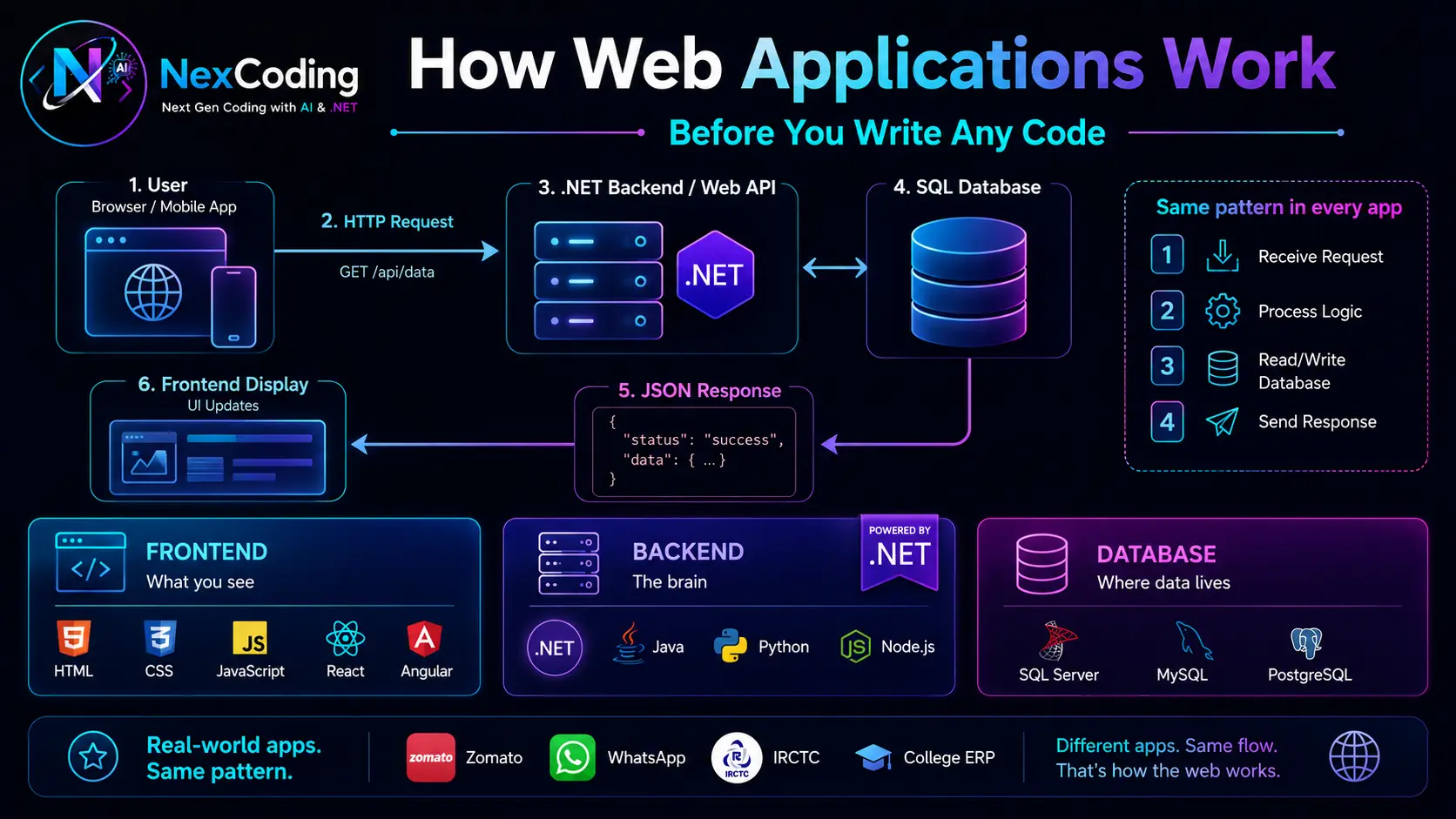
🔤 Quick Definitions
Before we begin, here are key terms you'll see in this article:
| Term | Meaning | Real Example |
|---|---|---|
| DNS | Domain Name System — finds server address for website | Type "google.com" → DNS finds Google's server (1.2.3.4) |
| HTTP Request | You asking for something from server | Browser sends: "Give me student results for Ravi Kumar" |
| JSON Response | Data format server sends back | { studentName: "Ravi", marks: 87, subject: "Maths" } |
| Cookies | Small files stored on your computer | YouTube remembers you're logged in using cookies |
| Backend/Server | Program running on remote computer | .NET program checking if teacher is allowed, fetching marks |
| API | Way for programs to talk to each other | Browser talks to .NET using API routes like /api/students/results |
| Database | Permanent storage for all data | SQL Server storing 5000 students, 50000 exam results |
| Deployed | Application is live on internet | school-management.nexcoding.in — anyone can access it |
Before you write a single line of code, understand what you are building toward.
Most tutorials throw syntax at you without explaining the bigger picture. After 6 months you know C# but cannot explain how Zomato works. This article fixes that.
What Happens When You Order Food on Zomato?
You tap Search. Results appear. Simple for you — here is what happened in 200 milliseconds:
| Step | Who | What happened |
|---|---|---|
| 1. Request | Your phone | Sends "Find biryani near lat:17.3 long:78.4" to Zomato's server |
| 2. Receive | Zomato server | A program (the backend) receives your message |
| 3. Query | Backend → Database | "Find restaurants tagged biryani within 5km" — searches millions of records |
| 4. Response | Server → Your phone | Returns list of restaurants as JSON data |
| 5. Display | Your phone | The frontend renders the JSON as cards with photos, ratings, prices |
The program running on Zomato's server is the backend — written in Java, .NET, Python, or Node.js. You never see it. But without it, the app shows nothing.
How It Looks — Simplified Flow Diagram
┌─────────────────────────────────────────────────────────────┐
│                         YOU (Browser)                         │
│                                                               │
│   Type: "Find pizza near me"                                 │
│   Click: Search                                              │
│                                                               │
│                          ↓ REQUEST                            │
│   "Send restaurants with pizza, location: (17.3, 78.4)"     │
└─────────────────────────────────────────────────────────────┘
                              ↓
                              ↓
┌─────────────────────────────────────────────────────────────┐
│                   Zomato Server (Backend)                    │
│                                                               │
│   Receives request                                           │
│   Checks: All parameters valid? ✓                            │
│   Queries database:                                          │
│   SELECT * FROM Restaurants WHERE category='pizza'          │
│            AND distance < 5km FROM (17.3, 78.4)             │
│   Found: 23 restaurants                                      │
│                                                               │
│                          ↓ RESPONSE                           │
│   Sends back JSON:                                           │
│   [ { name: "Pizza Hut", rating: 4.5, price: ₹250 },       │
│     { name: "Domino's", rating: 4.8, price: ₹200 }, ... ]  │
└─────────────────────────────────────────────────────────────┘
                              ↓
                              ↓
┌─────────────────────────────────────────────────────────────┐
│                         YOU (Browser)                         │
│                                                               │
│   Browser receives JSON                                      │
│   Renders cards:                                             │
│     [Pizza Hut ⭐4.5 ₹250] [Domino's ⭐4.8 ₹200] ...      │
│                                                               │
│   You see results in 200ms                                   │
└─────────────────────────────────────────────────────────────┘
How It Looks — Detailed Technical Flow
STEP 1: YOU TYPE IN BROWSER
┌──────────────────────────┐
│ URL: zomato.com          │
│ Action: Click Search     │
│ Sends HTTP Request ──────────────────→
└──────────────────────────┘

STEP 2: REQUEST TRAVELS (DNS → Server)
┌──────────────────────────────────────────────────┐
│ DNS lookup: "Find server for zomato.com"        │
│ Response: "zomato.com is at IP 1.2.3.4"        │
│ Browser connects to 1.2.3.4 (TCP handshake)    │
└──────────────────────────────────────────────────┘

STEP 3: SERVER RECEIVES & PROCESSES
┌──────────────────────────────────────────────────┐
│ Backend (Java/Python/.NET) receives request     │
│ Code runs:                                       │
│   Check user permission ✓                        │
│   Validate search parameters ✓                   │
│   Build SQL query                               │
│   Execute: SELECT FROM Restaurants...           │
└──────────────────────────────────────────────────┘

STEP 4: DATABASE RETURNS DATA
┌──────────────────────────────────────────────────┐
│ SQL Server searched 50,000 restaurant records   │
│ Found 23 matching records                        │
│ Returns data to backend                          │
└──────────────────────────────────────────────────┘

STEP 5: BACKEND FORMATS RESPONSE
┌──────────────────────────────────────────────────┐
│ Backend converts data to JSON format            │
│ Adds status code (200 = success)                │
│ Adds headers (content-type, server info)        │
│ Sends HTTP Response ──────────────────→         │
└──────────────────────────────────────────────────┘

STEP 6: BROWSER RECEIVES & DISPLAYS
┌──────────────────────────────────────────────────┐
│ Browser receives JSON                            │
│ Parses JSON (converts to objects)               │
│ JavaScript renders as HTML cards                │
│ CSS applies styling (colors, layout)            │
│ You see 23 restaurant options                   │
│ Total time: 200 milliseconds                    │
└──────────────────────────────────────────────────┘
The Same Pattern in Our School Management System
The project you will build on NexCoding works identically:
| Step | Who | What happened |
|---|---|---|
| 1. Request | Teacher's browser | GET /api/students/{id}/results with JWT token |
| 2. Receive | .NET Web API | Receives request, checks: "Is this teacher allowed to see this student?" |
| 3. Query | EF Core → SQL Server | SELECT marks FROM ExamResults JOIN Exams JOIN Subjects WHERE studentId = @id |
| 4. Response | API | Returns JSON: { student: "Ravi Kumar", results: [ {subject: "Maths", marks: 87} ] } |
| 5. Display | React frontend | Renders a results table — teacher sees Ravi Kumar's marks |
Every stage of NexCoding builds one part of this flow. By Stage 12 you have built ALL of it.
Real Applications Work Exactly Like This
When You Book a Train on IRCTC
- You: Type "Delhi to Hyderabad" + click Search (REQUEST)
- IRCTC Server: Checks database for trains between these cities on that date
- IRCTC Server: Finds 15 trains, calculates available seats for each
- Server → Your browser: Returns list of trains as JSON (RESPONSE)
- Your browser: Displays 15 train options with prices, timings, seat count
When You Login to Gmail
- You: Enter email + password (REQUEST)
- Gmail Server: Checks database — is email registered? Does password match?
- Server: If correct, creates session file (cookie) to remember you
- Server → Your browser: Returns "Login successful" + cookie (RESPONSE)
- Your browser: Stores cookie. Next time you visit, browser sends cookie. Gmail recognizes you without login again.
When Teacher Enters Student Marks (School Management System)
- Teacher: Opens marks form, enters "Ravi Kumar scored 87 in Maths" (REQUEST)
- Server: Validates — Is this teacher allowed to enter marks? Does Ravi exist? Is 87 valid? (Business rules)
- Server: Inserts row into database table
ExamResultswith studentId, marks, date - Server → Browser: Returns "Marks saved successfully" (RESPONSE)
- Next time any student views results: Server finds this record and shows it
All three work the same way. Pattern never changes.
The Three Parts of Every Web Application
Every application — Zomato, WhatsApp, IRCTC, your college ERP — has exactly three parts:
SMS Example: Login page where teacher enters email/password. Student dashboard showing their results. Teacher form to enter marks.
SMS Example: .NET program checks: Is teacher password correct? Is teacher allowed to enter marks for this class? Are marks within valid range (0-100)?
SMS Example: SQL Server tables: Students table (5000 rows), Teachers table (500 rows), ExamResults table (50000+ rows), Subjects table.
Every Application Does Exactly 4 Things
Regardless of whether it is Zomato, a hospital system, or your School Management System:
| # | What | Example — SMS |
|---|---|---|
| 1. RECEIVE | Get request from user | Teacher submits marks for Ravi Kumar |
| 2. PROCESS | Apply business rules | Check: marks ≤ MaxMarks? Student exists? Teacher authorised? |
| 3. DATABASE | Read or write data | INSERT INTO ExamResults or SELECT FROM Students |
| 4. RESPOND | Send result back | Return saved result / error message / data as JSON |
This pattern is the same in .NET, Java, Python, Node.js, Go, PHP.
The technology changes. The pattern never changes. Learn it once in .NET — you understand it everywhere.
Once You Know .NET — Any Stack is 70% Known
| Concept | .NET (C#) | Java | Node.js |
|---|---|---|---|
| HTTP routing | [Route("api/...")] | @RequestMapping | app.get('/api/...') |
| Request handling | IActionResult | ResponseEntity | req, res |
| Database ORM | EF Core | Hibernate | Sequelize |
| Dependency Injection | AddScoped() | @Autowired | Manual / NestJS |
| Middleware | app.Use() | Filter/Interceptor | app.use() |
| Authentication | JWT Bearer | Spring Security | Passport.js |
| Config file | appsettings.json | application.yml | .env |
| Async | async/await Task | CompletableFuture | async/await Promise |
Same concepts. Different syntax. A .NET developer switching to Java is productive in 2–3 months. To Node.js — 1–2 months.
Python — Right Tool, Wrong Starting Point
Python is excellent — for the right work:
| Python ✅ | Python ❌ | |
|---|---|---|
| Data analysis (pandas, numpy) | ✅ Best choice | |
| Machine learning (TensorFlow) | ✅ Best choice | |
| Scripting and automation | ✅ Good | |
| Enterprise web applications | ❌ Not standard | |
| Banking / insurance systems | ❌ Not standard | |
| Large team codebases | ❌ Dynamic typing = runtime bugs | |
| High-performance APIs | ❌ GIL limits parallelism |
For Indian IT jobs: Service companies (TCS, Infosys, Wipro) build banking, insurance, and government systems using .NET and Java — not Python. Python roles in these companies are mostly data/automation work, not core application development.
Read the Career Guide for the full comparison with job numbers.
Why This Matters for Your Career
Two students. Same 6 months:
Student A — learned Python basics, watched ML tutorials
- Asked in interview: "How does your application handle 1000 users simultaneously?"
- Cannot answer — never built a running application
Student B — built School Management System with .NET
- Asked the same question
- Answers: "I use async/await so the thread is freed during database calls. I'd add Redis caching for repeated queries. The API handles concurrent requests via the thread pool."
- Gets the job
The difference is not the language. It is understanding how applications actually work.
Want visual walkthrough of web flows? Video coming soon. Subscribe to NexCoding YouTube for updates.
🔍 Try This Right Now — See the Flow Yourself
Stop reading. Open your browser and watch requests happen live:
Steps:
-
Open Developer Tools
- Windows/Linux: Press
F12 - Mac: Press
Cmd + Option + I
- Windows/Linux: Press
-
Go to Network Tab
- Look for "Network" in the tabs at top
-
Open Any Website
- Type google.com in address bar
- Watch requests appear in real-time
-
Click on One Request
- Look at columns:
- Name: What was requested (image, data, HTML, CSS)
- Status: 200 = success, 404 = not found
- Type: document, xhr (API call), image, script, stylesheet
- Size: How much data was sent
- Time: How long it took
- Look at columns:
-
Click on Request → Look at Tabs
- Headers tab: Shows metadata, cookies, server info
- Response tab: Shows actual data server sent (JSON, HTML, etc.)
- Preview tab: Shows how browser interpreted it
What You'll Observe:
- Multiple requests appear instantly — One visit loads HTML, CSS, JavaScript, images, and API data. Each is separate request.
- Status 200 = success — Green checkmark. Request worked.
- JSON responses — Click an API request, go to Response tab. You'll see JSON:
{ key: value }— exactly what we talked about - Cookies stored — Go to Headers → scroll down. You'll see
Cookie:field with values likesessionId=abc123 - Requests are real — Every request you see is REAL communication between your browser and servers around the world
This is not magic. Every website works exactly like this.
Once you finish NexCoding, you will build this backend. The backend will handle these requests, query databases, and send JSON responses. You will BE THE SERVER.
Every time you use an app — Swiggy, PhonePe, your college portal — ask: "What request did my browser just send? What did the backend check? What did it read from the database? What came back?" After 2 weeks of thinking this way, backend development feels natural.