Vibe Coding vs Traditional Coding — Why You Need Both
You've seen the LinkedIn posts. "Built 3 web apps in 30 minutes with zero experience using AI." If you've wondered whether that's real, whether AI makes learning unnecessary, or whether impressive demos equal production software — this article is for you.
Quick Navigation
Skip to: What Vibe Coding Actually Is · Real Differences · The Gap · Why Fundamentals Matter · The Timeline Truth · What You Should Do
What is Vibe Coding?
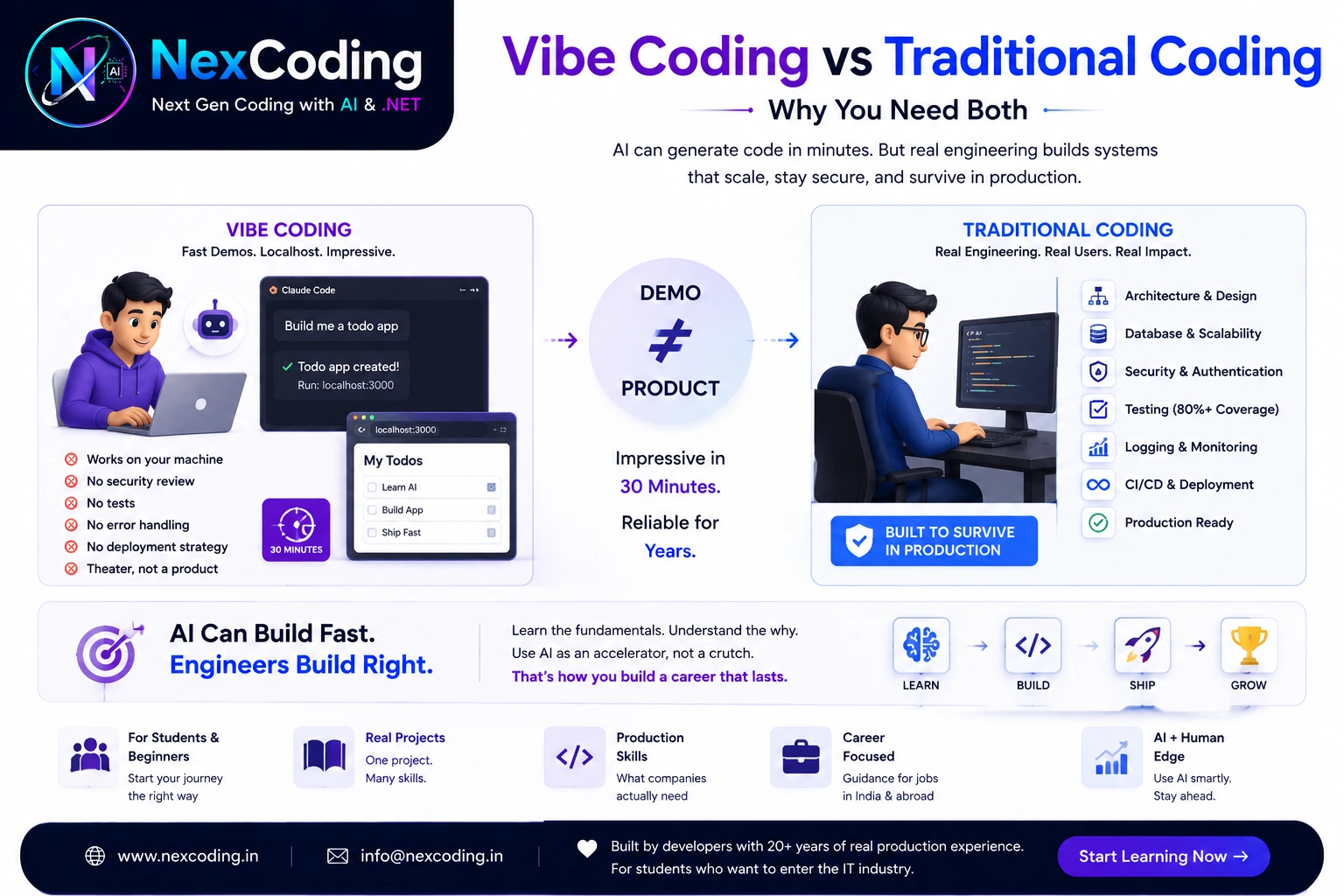
Vibe coding = using AI to generate working code without understanding it.
The workflow looks like this:
- ✅ Ask Claude Code: "Build me a todo app"
- ✅ Click run → localhost:3000
- ✅ It works on your machine
- ✅ Screenshot. Post online: "No experience needed, built in 5 minutes"
What actually happened:
- ✅ AI generated syntactically valid code
- ✅ Components connected to a database
- ✅ Frontend renders something functional
- ✅ Works. Today. On your machine.
What didn't happen:
- ❌ Security review
- ❌ Error handling for real users
- ❌ Database constraints and indexes
- ❌ Automated tests
- ❌ Documentation
- ❌ Deployment strategy
- ❌ Production monitoring and alerting
Theater, not a product. Impressive locally. Breaks in production.
You (in interview): "Built a full todo app with authentication in 30 minutes using AI."
Employer (thinking): "Can they debug code they didn't write? Do they understand why the code works? Can they architect a system from scratch?"
What they ask: "Walk me through your architecture. Why did you choose that database structure? How would you handle 10,000 concurrent users?"
You're silent. You don't know.
What is Traditional Coding?
Traditional coding builds systems that handle real users, real data, real money.
| Question | Vibe Coding | Traditional Coding |
|---|---|---|
| Goal | "Does it run?" | "Does it survive production?" |
| Users | Your machine only | 1 user → 1M users |
| Errors | Hope they don't happen | Every error caught + logged |
| Security | None considered | Auth, encryption, validation |
| Testing | Manual clicks | 80%+ automated coverage |
| Timeline | 30 minutes | 3–4 weeks of engineering |
A real product requires:
- Architecture — How do systems communicate? What's the dependency graph?
- Database design — Schemas, relationships, indexes. Can it handle scale?
- Security — Authentication, authorization, token management, encryption
- Error handling — Graceful failures, user-friendly messages, fallbacks
- Testing — Unit tests, integration tests, end-to-end flows
- Logging & monitoring — Debug production issues, track performance
- Scalability — Query optimization, caching, load balancing
- Deployment — Zero-downtime updates, rollbacks, CI/CD pipelines
- Observability — Health checks, alerts, performance dashboards
The 30-minute demo has none of this.
The Gap: Demo ≠ Product
What the demo hides:
- ❌ Failed deployments (no CI/CD pipeline)
- ❌ Race conditions under concurrent load
- ❌ SQL injection vulnerabilities
- ❌ Missing password hashing
- ❌ Cascading database errors
- ❌ Unhandled edge cases
- ❌ Silent crashes in production
Deploy to production. Watch it fail in week one. You have no logs to debug.
Real Example: "Todo App Built in 30 Minutes"
AI generates working code. Looks perfect. You deploy it:
Day 1: Traffic low. App works.
Day 3: 50 concurrent users. Race condition on fee calculation. Two students get charged twice.
Day 5: Second batch of users. Someone injects SQL in the name field. Database dumped.
Day 7: You don't even know it's broken until a parent calls complaining.
What was missing:
| Missing | Consequence |
|---|---|
| Input validation | XSS attacks, SQL injection |
| SQL parameterization | Data leaks |
| Authentication | Anyone accesses everyone's data |
| Rate limiting | DoS attack from single user |
| Error boundaries | App crashes silently |
| Database locks | Race condition on concurrent updates |
| Monitoring | No logs = can't debug |
| Rollback strategy | Corrupt data = can't undo |
You can't fix what you don't understand. You didn't write the code. You don't know how it works.
Why Fundamentals Come First
AI assumes you understand what the code does. Without fundamentals, you're operating blind:
| Skill | Without Fundamentals | With Fundamentals |
|---|---|---|
| Reading code | ❌ Can't tell if it's safe or dangerous | ✅ Spot vulnerabilities immediately |
| Debugging | ❌ Panic. No idea where to look | ✅ Read the stack trace. Fix it. |
| Architecture | ❌ Copy patterns blindly | ✅ Understand why patterns exist |
| Security | ❌ Vulnerabilities invisible | ✅ See risky code before prod |
| Performance | ❌ Don't know what's slow | ✅ Profile. Optimize. Prove it worked |
| Production | ❌ Breaks. Can't debug. | ✅ Logs tell the story. You fix it. |
Example: AI generates code that looks syntactically correct. Without SQL knowledge, you won't see that it's doing a full table scan on every request. With fundamentals, you spot the N+1 query immediately.
AI types fast. Understanding takes time — real time. Weeks. Months. Years.
But that time compounds. Understanding is the unfair advantage that never expires.
You build 10 AI-generated projects. They all work on localhost. You understand zero of them.
In your first interview: "Walk me through your architecture."
You can't. You're exposed immediately.
Or worse: you deploy to production confident in code you don't understand. It breaks. You panic because you can't debug what you didn't build.
This is where careers stall.
The Truth About "30 Minutes"
Here's the actual breakdown:
What the 30-minute post counts:
- ✅ Minute 0–2: Prompt AI
- ✅ Minute 2–8: AI generates code
- ✅ Minute 8–10: You click "run"
- ✅ Minute 10: "It works!" Screenshot posted
- 🟡 Minute 10–30: You watch it run on localhost
What they don't count — because it's boring:
| Phase | Timeline | What It Involves |
|---|---|---|
| Architecture | Week 1 | Design database schema. Plan API structure. Document decisions. |
| Implementation | Week 2 | Add error handling. Validate all inputs. Implement auth properly. |
| Testing | Week 3 | Write unit tests. Integration tests. Test edge cases. |
| Security | Week 4 | Audit code for vulnerabilities. Fix SQL injection risks. Add encryption. |
| Documentation | Week 4–5 | Write API docs. Code comments. Deployment guide. |
| Deployment | Week 5 | CI/CD pipeline. Staging environment. Rollback strategy. |
| Monitoring | Week 6 | Logging setup. Error tracking. Performance dashboards. Alerts. |
Real timeline: 5–6 weeks of actual engineering
The 30-minute demo is 5% of the work. The boring 95% is what makes it production-ready.
Code that runs locally ≠ code that works in production. Every successful app you use — Zomato, Swiggy, your bank app — has weeks of engineering behind it. There's no shortcut to that.
Before AI, you had to learn programming to build anything.
Now you can generate code without understanding it. This instantly reveals who actually knows systems and who copies.
The market will value understanding even more in the coming years. Because vibe coders will ship broken products. Real engineers will fix them — and get paid accordingly.
What AI Actually Does Well
AI is an accelerator, not a replacement. It excels at specific tasks:
| Task | AI Strength | Example |
|---|---|---|
| Boilerplate | ✅ Writes repetitive scaffolding in seconds | Setup new project structure |
| Known patterns | ✅ CRUD, login flows, pagination | Standard API endpoint |
| Speed | ✅ Hours → minutes | Generate 50 files at once |
| Refactoring | ✅ Apply pattern across 50 files | Rename a variable everywhere |
| Syntax | ✅ Language idioms, correct formatting | Correct method signatures |
AI cannot decide:
| Decision | Why AI Fails | You Must Know |
|---|---|---|
| Architecture | Multiple right answers. Context matters. | Why use this pattern over that? |
| Security | Invisible to casual inspection. | Where to authenticate? What to encrypt? |
| Database design | Depends on domain knowledge. | What relationships matter? Indexes? |
| Error handling | Varies by business logic. | Fail gracefully or fail fast? |
| Performance | Requires profiling. | What's actually slow? |
| Trade-offs | Requires experience. | When is "good enough" actually good enough? |
Analogy: AI is a calculator for developers.
- No math knowledge: Calculator is useless.
- Understand math: Calculator lets you work 10x faster.
Same with AI. Understand the fundamentals, and AI accelerates your work. Without them, you're typing prompts and hoping.
The NexCoding Approach
Structured learning exists for exactly this reason.
We don't teach you how to prompt AI better. We teach you how to engineer systems that actually work.
After you master fundamentals, AI becomes a tool. Before that, it's a trap.
The 9-stage journey:
| Stage | What You Learn | Time |
|---|---|---|
| 1–3 | How web apps work. C# fundamentals. Database design. | Month 1 |
| 4–6 | Connect code to database. Build backend API. | Month 2–3 |
| 7–8 | Master complex queries. Add React frontend. | Month 4–5 |
| 9 | Deploy to production. Monitor real users. | Month 6 |
By stage 9, you can:
- ✅ Explain every line of your code
- ✅ Debug production issues
- ✅ Optimize slow queries
- ✅ Spot security vulnerabilities
- ✅ Design systems that scale
Then you use AI. Not as a replacement for thinking. As an accelerator for patterns you already understand.
You're not copying demos. You're using AI to speed up what you know.
Question: "You built this with AI. Walk me through your architecture."
Bad answer: "Claude generated it. I don't know how it works."
Good answer: "The system needed multi-tenant isolation, so SchoolId is on every table. Students have many Exams through a junction table. EF Core handles relationships and migrations. The API validates all input because untrusted data is dangerous. Authentication uses JWT tokens stored in headers. Here's why I chose this approach over..."
One is vibe coding. One is engineering.
What Happens Next — The Market Reality
| Timeline | What's Actually Happening |
|---|---|
| 2024–2025 (Now) | AI generates code fast. LinkedIn explodes with "built 3 apps in 30 min" posts. |
| 2025–2026 | Companies hire vibe coders. Products ship. In week 2, critical bugs hit production. Data leaks. Bad press. |
| 2026–2027 | Companies realize generated code isn't engineered code. Vibe coders hit their ceiling. Can't debug. Can't optimize. Can't architect. |
| 2027+ | Experience becomes premium. Senior engineers who understand systems command 2–3x salaries. Vibe coders stuck at junior level. |
The bet:
-
Vibe coder bet: "AI will do everything. I don't need to learn."
Result: You hit your ceiling fast. You can't grow beyond prompting. -
Engineer bet: "I master fundamentals now. Then I use AI to speed up what I know."
Result: You can debug, architect, optimize. AI makes you 10x faster.
In 3 years, the salary difference between "engineer who uses AI" and "person who prompts AI" could be 2–3x.
Time is the only unfair advantage left. Use it to understand systems. Not to output code faster.
What You Should Do
Step 1: Learn Properly — Don't Rush
Understand how web applications actually work. Learn a language deeply. Build a real project with:
- ✅ Proper error handling
- ✅ Automated tests
- ✅ Real database
- ✅ Actual documentation
Timeline: 4–6 months if you're consistent. One article per day.
Step 2: Build Real Things
Not demos. Real code.
- Code that handles edge cases
- Code you'd ship to production
- Code with tests (prove it works)
- Code with error handling (prove it won't crash)
Deploy it. Run it under load. Fix the bugs. Learn why it broke.
Step 3: Then Use AI
Once you understand the fundamentals, AI becomes a speed tool.
- Use it for boilerplate ✅
- Use it for scaffolding ✅
- Use it for refactoring ✅
- DON'T use it to replace thinking ❌
You're in control. The code serves your vision, not the other way around.
Complete beginner?
How Web Applications Work — Understand what you're about to build.
Want to learn .NET?
What is .NET — The platform where you'll build real systems.
Not sure about your path?
Career Guidance — Honest advice for what to learn and why.
Build real systems. Understand every part. Then let AI accelerate what you know.
The future belongs to engineers who understand. Not to people who can type prompts fast.
Final Truth
AI made everyone a builder overnight. Production is unforgiving.
The developers who thrive in the next 5 years won't be the ones fastest at typing prompts. They'll be the ones who understand why their code works.
That understanding takes time. But time is the only unfair advantage left.
You can:
- ✅ Build 100 AI-generated demos and understand zero of them
- ❌ Learn nothing, rely on AI forever, hit your ceiling at junior level
Or:
- ✅ Master 9 core engineering stages over 6 months
- ✅ Build one real system from scratch
- ✅ Understand every line
- ✅ Then use AI to amplify what you know
- ✅ Grow as an engineer, not a prompt-writer
The choice is yours. But choose wisely. Time is the only unfair advantage left.
Vibe coder: "I built a lot of things with AI. Why am I still junior?"
Engineer: "I understand systems. I can debug. I can optimize. I can architect. AI just made me faster."
Both used the same tools. One has the same skills. The other leveled up.
by NexCoding Team
Last updated: May 2026